> ## Documentation Index
> Fetch the complete documentation index at: https://hexprep.mintlify.site/llms.txt
> Use this file to discover all available pages before exploring further.
# Manual Integration: Flexible DTC and Custom Shipments
> Manage DTC and B2B shipments in HexPrep outside any marketplace — clients upload labels or provide a destination address for the warehouse to generate one.
The **Manual Integration** is a flexible workflow for shipments that aren't tied to a marketplace integration like FBA or FBM. It's designed primarily for **direct-to-consumer (DTC)** orders, custom B2B shipments, returns, or any scenario where the client wants to directly control how the shipment is labeled or where it's going.
## How It Works
With Manual shipments, clients can:
* **Request a shipment** from their dashboard
* Either **upload a shipping label** they've already purchased
* Or **provide a destination address** so the warehouse can generate and purchase the label directly
This setup gives both the client and warehouse maximum flexibility while still keeping the process organized inside HexPrep's Dashboard.
## Client Workflow
The client attaches the shipping label file during the request.
## Summary
* Ideal for **DTC** or **custom orders**
* Clients can **upload** their own labels
# Retailer Returns
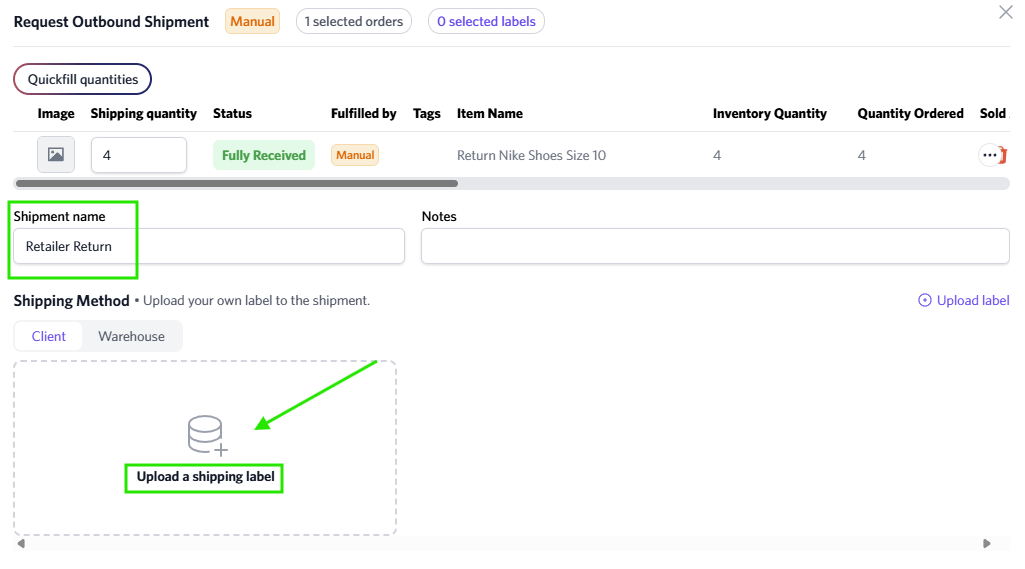
To return inventory back to the retailer, the HexPrep team will create a **Manual** inbound in the **Inventory** tab. Once it's created, you'll need to submit a request for the inventory to be shipped out and provide the return shipping label.
The item name will begin with **"Return"**, followed by the name of the inventory.
Please ensure you name the outbound shipment name "Retailer Return".
 Any inventory identified as damaged will automatically have a **Manual** inbound created in the **Inventory** section.
If you would like non-damaged inventory returned to the retailer, you must notify the HexPrep team so we can process the return.
Any inventory identified as damaged will automatically have a **Manual** inbound created in the **Inventory** section.
If you would like non-damaged inventory returned to the retailer, you must notify the HexPrep team so we can process the return.