
How It Works
With Manual shipments, clients can:- Request a shipment from their dashboard
- Either upload a shipping label they’ve already purchased
- Or provide a destination address so the warehouse can generate and purchase the label directly
Client Workflow
- Upload Your Own Label
The client attaches the shipping label file during the request.
Summary
- Ideal for DTC or custom orders
- Clients can upload their own labels
Retailer Returns
To return inventory back to the retailer, the HexPrep team will create a Manual inbound in the Inventory tab. Once it’s created, you’ll need to submit a request for the inventory to be shipped out and provide the return shipping label. The item name will begin with “Return”, followed by the name of the inventory.Please ensure you name the outbound shipment name “Retailer Return”.
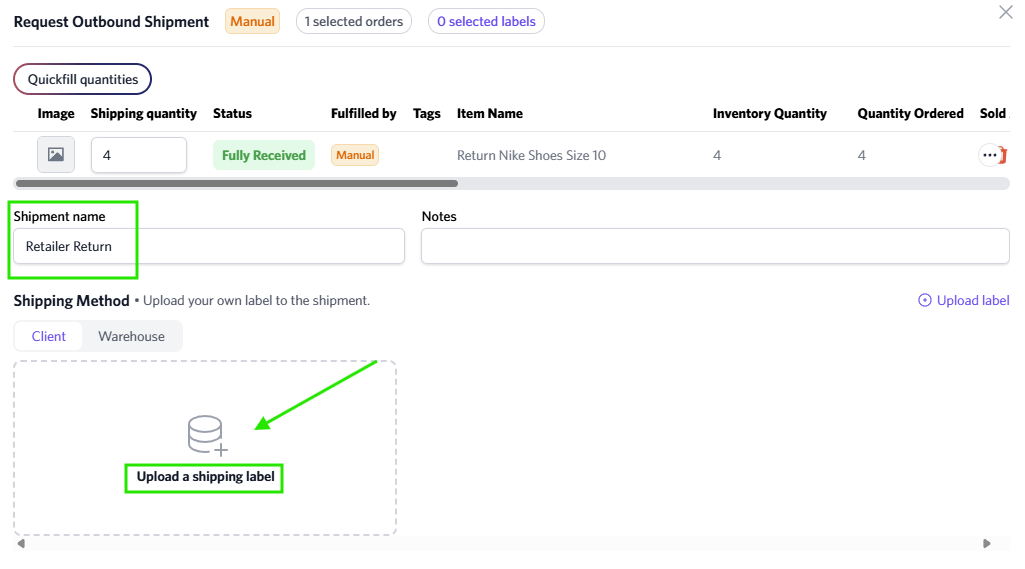
Any inventory identified as damaged will automatically have a Manual inbound created in the Inventory section.
If you would like non-damaged inventory returned to the retailer, you must notify the HexPrep team so we can process the return.